Mechanical Keyboard Switches Explained: Linear, Tactile, Clicky and More
A mechanical keyboard can feel completely different depending on the switches installed beneath its keycaps. Some offer smooth and uninterrupted movement, while others provide noticeable physical feedback or an audible click. These differences influence not only typing comfort but also how players interact with their games.
For gaming enthusiasts, choosing the right switch is worth considering. Frequent key presses, directional movement, skill combinations, and other in-game actions all contribute to the overall keyboard experience. Understanding the different types of mechanical keyboard switches can help you make a more informed decision. Whether you prefer linear, tactile, or clicky switches, each design offers its own characteristics.
1. Understanding the Basics of Mechanical Keyboard Switches
Mechanical keyboard switches are individual mechanisms positioned beneath each keycap. When a key is pressed, the switch detects the movement and sends an input signal to the connected computer. Unlike membrane keyboards, which use pressure-sensitive layers to register input, mechanical keyboards use separate switches for individual keys. This allows manufacturers to offer different levels of resistance, travel distances, and feedback.
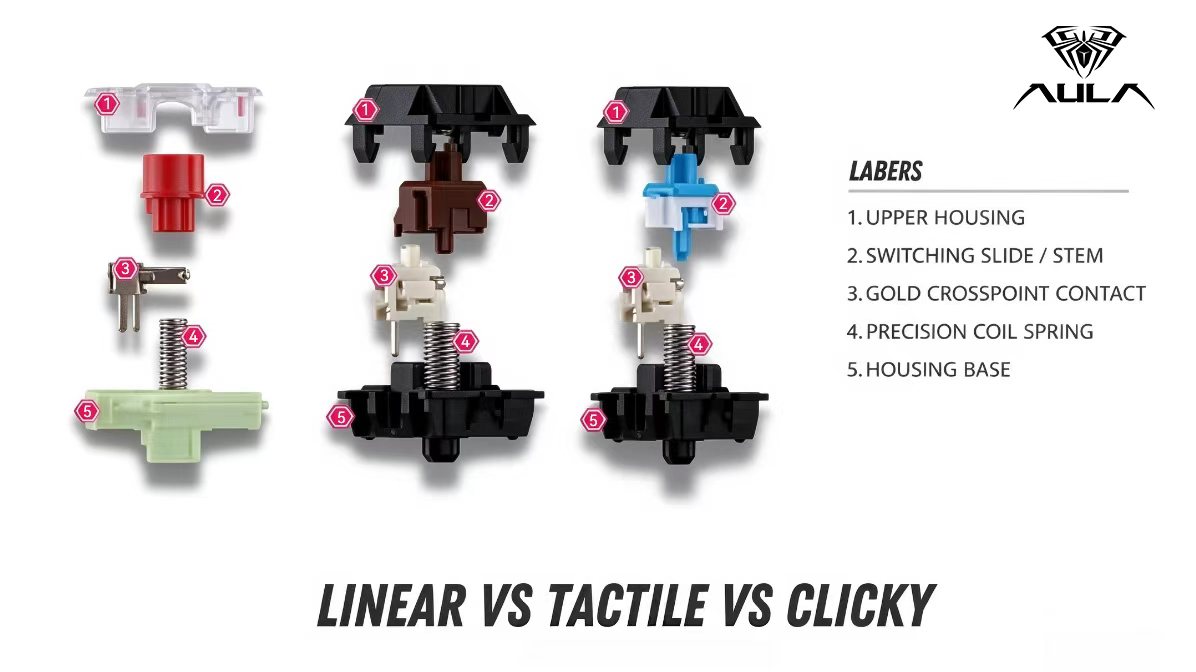
A traditional mechanical switch generally contains four main components:
Stem: The moving component connected to the keycap. Its shape and design influence the movement and feel of the switch.
Spring: Provides resistance when a key is pressed and helps return it to its original position.
Housing: Holds the internal components together and contributes to the switch's stability and sound characteristics.
Electrical Contacts: Detect a keystroke when the switch reaches its actuation point.
Although these components may look similar, differences in materials, construction, and internal design can create noticeably different typing experiences.
2. Linear, Tactile, and Clicky: How Do They Feel Different?
The three main types of mechanical keyboard switches are linear, tactile, and clicky. Their biggest difference is the feedback users experience during a keypress.
Linear Switches: Smooth and Consistent Movement
Linear switches move smoothly from the top of the keystroke to the bottom without a noticeable tactile bump or built-in clicking mechanism.
This consistent movement makes them a popular option for gaming keyboards, particularly among players who frequently press the same keys during gameplay.
Main characteristics:
Smooth and uninterrupted key travel.
No noticeable tactile bump.
No built-in audible click.
Available in different spring weights and actuation specifications.
For FPS players, linear switches are often appealing because directional movement and repeated key presses feel consistent. They can also suit players who prefer a straightforward response without additional tactile feedback. However, linear switches are not automatically faster than tactile or clicky switches. Actual input response depends on the switch's specifications, keyboard electronics, and the player's technique.
Tactile Switches: Noticeable Feedback During Typing
Tactile switches feature a noticeable bump during the keypress. This physical feedback allows users to feel a change in resistance as the switch passes through its actuation area.
Unlike clicky switches, tactile switches do not necessarily produce a distinct clicking sound.
Main characteristics:
Noticeable physical feedback.
A change in resistance during the keystroke.
No dedicated audible click mechanism in conventional tactile designs.
Different levels of tactile intensity depending on the switch.
Tactile switches are worth considering for users who divide their time between gaming and everyday typing. The physical feedback can make each keystroke feel more deliberate, which some people prefer when writing, working, or entering commands.
Clicky Switches: Audible Feedback with Every Press
Clicky switches combine tactile feedback with a distinct clicking sound. This creates a more noticeable response when pressing a key.
For mechanical keyboard enthusiasts, the sound itself can be an important part of the typing experience.
Main characteristics:
A noticeable tactile bump.
An audible click during actuation.
More pronounced feedback than many conventional linear switches.
A distinctive typing sound.
Clicky switches can be enjoyable for writing and casual gaming, especially for users who appreciate audible feedback. However, the additional noise may not be suitable for shared offices, quiet gaming rooms, or environments where other people are nearby.
3. Which Mechanical Keyboard Switch Is Better for Gaming?
There is no single switch type that works best for every gamer. The right choice depends on the games you play, how frequently you press certain keys, and the kind of feedback you prefer.
FPS Games
In first-person shooters, players frequently use directional keys, jump commands, and other repeated inputs. Linear switches are a popular choice because their smooth movement provides a consistent feel during these actions.
MOBA and Strategy Games
Players in MOBA and strategy games often rely on repeated ability inputs and keyboard shortcuts. Both linear and tactile switches can work well, depending on whether the player prefers smooth movement or noticeable feedback.
MMORPG and General Gaming
For games involving extended keyboard sessions, comfort becomes an important consideration. Some players prefer linear switches for uninterrupted movement, while others enjoy tactile feedback during frequent skill activation.
Gaming and Everyday Productivity
If you regularly switch between gaming, writing, and office tasks, tactile switches may offer a comfortable balance between physical feedback and general usability.
Ultimately, personal preference matters more than choosing a switch simply because it is popular among other players.
4. How Do Actuation Force and Travel Distance Affect Keyboard Performance?
Apart from switch categories, actuation force and travel distance are two specifications worth understanding when comparing mechanical keyboard switches.
Actuation Force
Actuation force refers to the amount of pressure required to activate a switch.
Lighter switches generally require less force to press, while heavier switches need more pressure before registering an input.
For gamers, lighter switches may feel comfortable during repeated key presses. On the other hand, some users prefer heavier switches because they provide more resistance and a more deliberate typing sensation.
Neither option is universally better. The ideal actuation force depends on finger strength, typing habits, and personal comfort.
Actuation Point and Total Travel Distance
These terms describe different stages of a keystroke.
The actuation point is where the keyboard registers an input. Total travel distance refers to the full movement of the key from its resting position to the bottom of its travel.
For example, a key can register an input before reaching the bottom. This distinction is relevant during gaming, particularly when players repeatedly press and release directional keys.
When comparing gaming keyboard switches, looking at both specifications provides a better understanding of their input characteristics.
5. Why Do Mechanical Keyboards Produce Different Sounds?
Keyboard sound is another reason mechanical keyboards attract enthusiasts. Terms such as Thock, Clack, Crisp, Deep, and Muted are commonly used to describe different acoustic characteristics.
However, the switch is only one part of the overall sound profile.
Several factors influence how a mechanical keyboard sounds:
Switch Construction and Lubrication
The internal design, spring characteristics, and lubrication affect friction and the sound produced during movement.
Plate Material
The keyboard plate supports the switches and influences how vibrations travel through the structure. Different materials can produce different acoustic characteristics.
Mounting Structure
Gasket-mounted keyboards use cushioning materials between structural components. Depending on the implementation, this can influence both typing feel and sound.
Keycap Material
PBT and ABS keycaps can produce different acoustic results. Thickness, profile, and overall construction also contribute to the final sound.
Internal Sound-Dampening Materials
Foam and other dampening materials can reduce certain unwanted resonances and help shape the keyboard's sound profile.
This explains why two keyboards equipped with similar linear switches may sound noticeably different. The complete keyboard construction matters just as much as the individual switch.
6. Mechanical Switches vs. Hall Effect Switches
Hall Effect switches have become increasingly relevant in gaming keyboard discussions. Although they serve a similar purpose, their input detection methods differ from those of traditional mechanical switches.
Traditional mechanical switches generally use physical electrical contacts to register a keypress.
Hall Effect switches use magnets and sensors to detect changes in magnetic fields as a key moves. This technology allows compatible keyboards to support additional input customization.
Some common features include:
Adjustable Actuation: Allows users to customize the position at which a key registers an input.
Rapid Trigger: Dynamically adjusts the reset behavior according to key movement, which can be useful for repeated inputs.
Customizable Input Response: Provides greater control over how keys respond during gameplay.
These features are particularly relevant to competitive gaming, where repeated directional inputs and precise movement can influence player control.
However, Hall Effect switches and traditional mechanical switches use different detection technologies. Neither automatically provides a better typing experience for every user.
For a more detailed explanation, explore our related article: What Are Hall Effect Switches? A Beginner's Guide to Magnetic Keyboard Technology.
7. How to Choose the Right Mechanical Keyboard Switch
Before choosing a mechanical keyboard, consider how you actually use it. Gaming performance, typing comfort, noise levels, and personal preferences should all be part of the decision.
Here are a few practical recommendations:
Choose Linear Switches If:
You prefer smooth key movement, consistent resistance, and uninterrupted keystrokes. They are a popular starting point for FPS players and users who frequently repeat the same inputs.
Choose Tactile Switches If:
You enjoy physical feedback and want a switch that works for both gaming and everyday typing.
Choose Clicky Switches If:
You appreciate noticeable feedback and enjoy hearing each keystroke. Just remember that the additional sound may not suit every environment.
Consider Quieter Switch Designs If:
You frequently use your keyboard in shared spaces or prefer a less noticeable typing sound. Look for switches specifically designed to reduce noise rather than assuming all linear switches are quiet.
Whenever possible, test different switch types before making a decision. Even small differences in spring weight, actuation force, and tactile feedback can noticeably affect long-term comfort.
Final Thoughts:
Mechanical keyboard switches have a direct influence on how a keyboard feels during gaming and everyday use. Linear switches provide smooth movement, tactile switches offer physical feedback, and clicky switches combine tactile response with an audible sound.
For gamers, the best choice is not necessarily the lightest, loudest, or most popular switch. It is the one that matches their playing habits, preferred feedback, and comfort requirements.
AULA continues to explore different keyboard technologies and user preferences, offering gaming keyboard enthusiasts more options for building a setup that suits their needs.
Understanding switch types and their characteristics is a useful first step toward choosing a mechanical keyboard that feels right for the way you play.
AULA | Fuel Your Passion.