
Hall Effect vs. Mechanical Keyboard Switches: What's the Difference?
Introduction: Hall Effect or Mechanical Switches – Which Is Right for You?
A gaming keyboard is more than a collection of keys. The switches underneath each key determine how your inputs are registered, how the keyboard feels during use, and how much control you have over its response.
For years, traditional mechanical keyboard switches have been the preferred choice for gamers, office users, and keyboard enthusiasts. Their familiar typing characteristics, different switch types, and broad compatibility have made them a popular option across different keyboard categories.
However, Hall Effect technology has introduced another approach to keyboard input. By using magnetic sensing instead of conventional electrical contacts, Hall Effect switches can detect key movement and support features such as adjustable actuation and Rapid Trigger on compatible keyboards.
So, when comparing Hall Effect vs. mechanical keyboard switches, what are the actual differences? Does magnetic sensing make a keyboard better for gaming, or are traditional mechanical switches still the more practical choice?
The answer depends on how you use your keyboard. Understanding the technology, typing experience, and supported features will help you make a more informed decision.
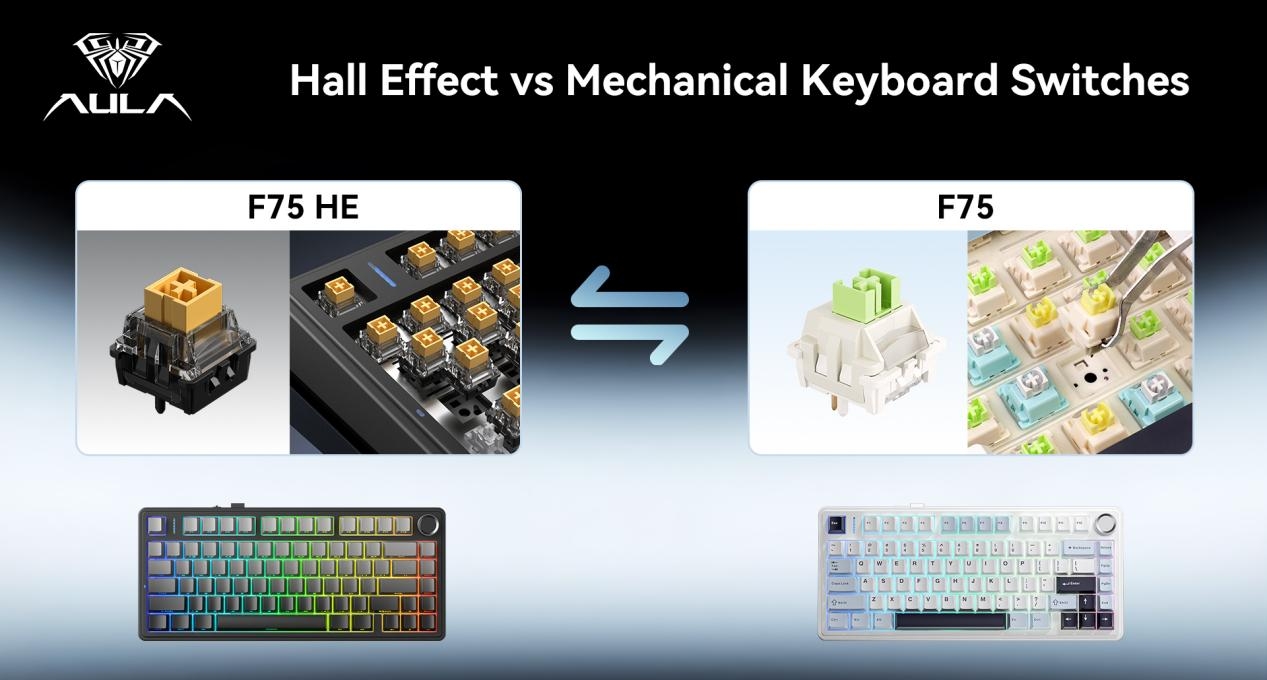
1. How Do Mechanical and Hall Effect Keyboard Switches Work?
The fundamental difference between these two switch technologies lies in how they detect a keypress.
Traditional Mechanical Keyboard Switches
Traditional mechanical switches use physical electrical contacts to register keystrokes. When a key is pressed, the switch stem moves downward until the electrical contacts connect, sending an input signal to the computer.
Although the operating principle is relatively straightforward, mechanical switches come in several designs that create different typing experiences.
Linear switches: Provide smooth key travel without a noticeable tactile bump. They are popular among gamers who prefer consistent movement throughout a keystroke.
Tactile switches: Feature a noticeable bump during the press, providing physical feedback without necessarily producing a loud click.
Clicky switches: Combine tactile feedback with an audible clicking sound, making each keystroke more noticeable.
This variety is one of the biggest advantages of traditional mechanical keyboard switches. Users can select a switch based on typing comfort, preferred sound, and gaming habits.
Hall Effect Magnetic Switches
Hall Effect switches use magnets and magnetic sensors to detect key movement. Instead of relying on conventional electrical contacts to register a press, the keyboard measures changes in the magnetic field as the switch moves.
As the key travels downward or returns upward, the magnet changes position relative to the sensor. The keyboard controller interprets these changes to determine the key's position and whether an input should be registered.
This position-based detection makes additional input customization possible on supported Hall Effect keyboards.
Depending on the keyboard and its software, users may be able to adjust actuation points, configure Rapid Trigger, and customize how individual keys respond.
The important distinction is that mechanical switches generally register a keypress through physical electrical contact, while Hall Effect switches use magnetic sensing to detect key movement.
2. Hall Effect vs. Mechanical Switches: The Main Differences
Understanding the differences becomes easier when looking at how each technology affects everyday keyboard use.
Detection method: Traditional mechanical switches use electrical contacts, whereas Hall Effect switches rely on magnetic field sensing.
Actuation adjustment: Mechanical switches generally have a fixed actuation point determined by their physical design. Compatible Hall Effect keyboards allow users to adjust the actuation point through software.
Reset behavior: Conventional mechanical switches typically rely on a defined reset point. Supported Hall Effect keyboards can use dynamic reset behavior through Rapid Trigger.
Typing feel: Mechanical switches offer linear, tactile, and clicky options. Hall Effect switches also vary in feel depending on their stem, spring, and internal construction.
Sound profile: Neither technology guarantees a particular sound. Switch construction, keycaps, stabilizers, mounting structure, and sound-dampening materials all contribute to the final result.
Customization: Mechanical keyboards offer switch choices and various keyboard-level settings. Hall Effect keyboards can provide additional control over actuation and reset behavior when supported by their firmware and software.
Typical applications: Both technologies work for typing, office tasks, and gaming. Hall Effect keyboards are particularly interesting to competitive players who want more control over repeated inputs and key response.
Neither technology is automatically superior in every situation. The overall keyboard design and the user's preferences remain important.
3. Adjustable Actuation: What Makes Hall Effect Keyboards Different?
One of the most useful features associated with Hall Effect keyboards is adjustable actuation.
Actuation refers to the point during a keypress at which the keyboard registers an input. It affects how far a key must travel before the computer receives the signal.
How Does Actuation Work on Mechanical Keyboards?
On traditional mechanical keyboards, the actuation point is generally determined by the switch design. Different mechanical switches may have different actuation characteristics, but users cannot usually change the actuation point freely through software.
For example, someone who prefers a lighter or shorter keypress may select a switch designed with a corresponding actuation characteristic. However, changing that behavior often requires choosing a different switch or keyboard.
How Does Adjustable Actuation Work on Hall Effect Keyboards?
Hall Effect technology allows the keyboard to detect key position throughout its movement. On compatible models, this information can be used to let users configure how far a key must travel before registering.
A shorter actuation setting allows a key to register with less downward movement. This may suit players who prefer a more immediate input response, although it can also make accidental inputs more likely if the setting is too sensitive.
A deeper actuation setting requires more key travel before registering a press. Some users prefer this because it provides more deliberate input and can help reduce unintended keystrokes.
Another advantage is that supported keyboards may allow different actuation settings for different keys. For example, frequently used movement keys can be configured differently from keys used for menus or other actions.
This flexibility is one reason adjustable actuation has become an important feature in the Hall Effect gaming keyboard market. However, adjustment ranges and available settings vary by model, so buyers should check the manufacturer's specifications.
4. Rapid Trigger: Why Is It Important for Gaming?
Rapid Trigger is one of the most discussed features of modern Hall Effect gaming keyboards.
To understand its value, it helps to look at how conventional key reset behavior works.
On a traditional mechanical keyboard, a pressed key generally needs to return past its defined reset point before another press can register. This behavior is determined by the switch's physical mechanism.
On compatible Hall Effect keyboards, Rapid Trigger uses continuous key-position detection to dynamically determine when a key resets and registers again. The key can reset as it moves upward and register another press when it moves downward, without relying on one fixed reset point in the same way as a conventional mechanical switch.
This can be useful when a game requires frequent, repeated inputs or quick changes in movement direction.
Where Can Rapid Trigger Make a Difference?
FPS Games
In tactical shooters, movement control is an important part of gameplay. Players often need to switch directions quickly, stop movement accurately, or coordinate movement with aiming. Rapid Trigger can provide more responsive key reset behavior for supported movement keys, giving players additional control over repeated inputs.
Rhythm Games
Rhythm games often involve repeated keypresses that need to follow precise timing. Adjustable actuation and dynamic reset behavior can give players more flexibility when configuring their keyboards for different play styles.
Fast-Paced Competitive Games
Games involving frequent directional changes, repeated actions, or rapid key combinations may also benefit from customizable input behavior. Players can experiment with different settings to find a configuration that feels comfortable and consistent.
It is important to keep expectations realistic. Rapid Trigger does not automatically improve reaction time or guarantee better competitive results. Its value comes from changing how the keyboard responds to key movement, while player skill, practice, game settings, and hardware performance remain essential.
5. Typing Feel and Sound: Are Hall Effect Switches Different?
Input technology is only one part of the keyboard experience. For many users, the feel and sound of each keystroke matter just as much.
Mechanical Switches Offer Familiar Typing Choices
Traditional mechanical keyboards provide a broad selection of switch characteristics. Linear switches offer smooth movement, tactile switches provide a noticeable bump, and clicky switches create more audible feedback.
This variety makes mechanical keyboards appealing to people who want to customize their typing experience. Whether the keyboard is used for writing, programming, gaming, or everyday office work, there are different switch options to explore.
Hall Effect Switches Depend on Their Physical Construction
Magnetic sensing does not automatically make a keyboard smoother, quieter, softer, or more comfortable. These characteristics depend on the physical design of the switch and the keyboard as a whole.
The stem structure, spring weight, lubrication, keycap material, stabilizers, and mounting system all influence how a Hall Effect keyboard feels when typing.
Sound follows the same principle. A Hall Effect keyboard may produce a deeper, more muted sound or a sharper, more pronounced keystroke depending on its construction. The magnetic sensing mechanism itself does not determine whether the keyboard sounds like a Thock or Clack build.
If typing comfort and sound are important to you, pay attention to the complete keyboard configuration rather than choosing based solely on whether it uses magnetic or mechanical switches.
6. Durability and Maintenance: Which Technology Lasts Longer?
Durability is another factor worth considering when comparing Hall Effect vs. mechanical switches.
Traditional mechanical switches use physical electrical contacts to register keypresses. Over time, repeated operation can contribute to contact wear, depending on the switch design, materials, and usage conditions.
Hall Effect switches detect key movement through magnetic sensing rather than conventional contact closure. This avoids the same type of electrical contact wear associated with traditional mechanical switch detection.
However, it would be misleading to conclude that every Hall Effect keyboard automatically lasts longer.
Both technologies still contain moving components, including stems and springs. These parts can experience mechanical wear after extended use. Other factors, such as PCB quality, switch materials, manufacturing consistency, firmware, and overall assembly, also influence product reliability.
For buyers comparing keyboards, the manufacturer's rated switch lifespan, warranty coverage, and quality-control information are more useful than relying on the switch category alone.
7. Which Should You Choose: Hall Effect or Mechanical Keyboard Switches?
There is no universal winner in the Hall Effect vs. mechanical keyboard comparison. The right option depends on your priorities and the type of work or gaming you do.
Choose a Traditional Mechanical Keyboard If:
You prefer familiar linear, tactile, or clicky typing characteristics.
You want a wide selection of switch types and sound profiles.
You use your keyboard for everyday typing, office work, and general gaming.
You value a straightforward typing experience without needing extensive actuation customization.
You want to explore different switch designs and keyboard configurations.
Choose a Hall Effect Keyboard If:
You play competitive games where repeated movement inputs are important.
You want to adjust actuation points on compatible keyboards.
You are interested in Rapid Trigger and dynamic reset behavior.
You enjoy customizing key response for different games.
You want to experiment with magnetic switch technology and its additional input settings.
For users who spend most of their time typing documents, browsing, or working in an office, a well-built mechanical keyboard may provide everything they need. For competitive gamers who want more control over key actuation and reset behavior, a Hall Effect keyboard may offer additional advantages.
Rather than asking which technology is universally better, consider which features will make a meaningful difference in your daily use.
8. Explore AULA Hall Effect Gaming Keyboards
For gamers interested in magnetic switch technology, AULA offers several Hall Effect keyboard models with different designs and product positioning.
AULA F75 HE – A Familiar 75% Layout with Magnetic Technology
The F75 HE brings the recognizable 75% keyboard layout into the Hall Effect category. Its compact layout maintains a practical balance between desk space and frequently used keys, while magnetic switch technology introduces supported input customization features.
For users familiar with the F75 design who want to explore magnetic keyboard functionality, this model offers a familiar starting point. Check the individual product specifications for its available actuation settings and Rapid Trigger support.
AULA HERO75 HE – Gaming Functionality with a Distinctive Design
The HERO75 HE combines a 75% layout with a colorful appearance inspired by the four seasons. It brings together a more distinctive visual style and Hall Effect input technology for users who want their keyboard to reflect their personal setup.
Beyond its appearance, the model offers magnetic switch functionality and supported input customization, making it another option to consider when comparing Hall Effect gaming keyboards.
AULA AG75 – A More Premium Magnetic Keyboard Design
The AG75 takes a more premium approach to magnetic keyboard construction. Its CNC aluminum body gives the keyboard a different material and design character, while its magnetic input features are aimed at users interested in configurable gaming performance.
For buyers comparing premium Hall Effect keyboards, the AG75 provides another combination of construction, appearance, and magnetic input functionality to explore.
Each model has its own design and feature positioning. Before purchasing, review the product specifications to confirm the supported switch settings, connection options, software functions, and other configurations.
9. Frequently Asked Questions About Hall Effect and Mechanical Switches
Are Hall Effect switches better than mechanical switches?
Not necessarily. Hall Effect switches use magnetic sensing and can support adjustable actuation and Rapid Trigger on compatible keyboards. Traditional mechanical switches offer a wide range of familiar typing characteristics. The better option depends on your gaming habits, typing preferences, and desired features.
Can Hall Effect keyboards be used for everyday typing?
Yes. Hall Effect keyboards can be used for everyday typing, office work, programming, and general computer use. Their suitability depends on the switch feel, layout, actuation settings, and personal preferences. Users who are new to adjustable actuation may need some time to find comfortable settings.
Do Hall Effect switches have faster response times?
Hall Effect sensing enables position-based input detection and features such as Rapid Trigger on supported keyboards. However, the actual response performance depends on the keyboard's controller, firmware, polling rate, connection mode, and configuration. Magnetic sensing alone does not guarantee that every Hall Effect keyboard is faster than every mechanical keyboard.
Do all Hall Effect keyboards support Rapid Trigger?
No. Hall Effect technology makes dynamic key-position detection possible, but Rapid Trigger still depends on the keyboard's firmware, software, and supported features. Buyers should check the specifications of the exact model rather than assuming that every magnetic keyboard includes it.
Do Hall Effect keyboards sound different from mechanical keyboards?
Not necessarily. Hall Effect describes how the keyboard detects a keypress, not its sound profile. Switch construction, spring characteristics, keycaps, stabilizers, plate material, mounting structure, and internal dampening all influence the final sound.
Can Hall Effect switches be replaced with traditional mechanical switches?
Usually, Hall Effect and traditional mechanical switches are not interchangeable. They use different detection systems and may have different electrical and physical requirements. Always check the manufacturer's compatibility information before replacing switches or modifying a keyboard.
Final Thoughts: Choose the Keyboard Technology That Fits Your Needs
The main difference between Hall Effect and traditional mechanical keyboard switches is how they detect key movement and what that technology allows users to customize.
Mechanical switches remain a strong choice for people who value familiar typing characteristics, switch variety, and different sound profiles. Hall Effect switches bring magnetic sensing into the keyboard market, making adjustable actuation and Rapid Trigger possible on compatible models.
Neither technology is automatically the right choice for everyone. A keyboard should be evaluated as a complete product, including its switch construction, layout, build quality, firmware, and overall typing experience.
If you value a familiar and varied typing experience, traditional mechanical keyboards are still worth considering. If you want more control over actuation and repeated inputs for competitive gaming, a Hall Effect keyboard may be a better match.
Explore the AULA Hall Effect keyboard range to discover different approaches to magnetic input technology and find a keyboard that matches your gaming preferences.
AULA | Fuel Your Passion.


