QWERTY vs Dvorak: Which Is Less Tiring, Which Is More Convenient
To cut to the chase: Dvorak delivers a superior typing experience in terms of hand comfort, while QWERTY wins when it comes to practical compatibility. The former determines how fatigued your hands get within an hour; the latter decides how many headaches you will run into over time.
1. Side by Side Comparison
| Metric | QWERTY | Dvorak |
|---|---|---|
| Release Year | 1873 | 1936 |
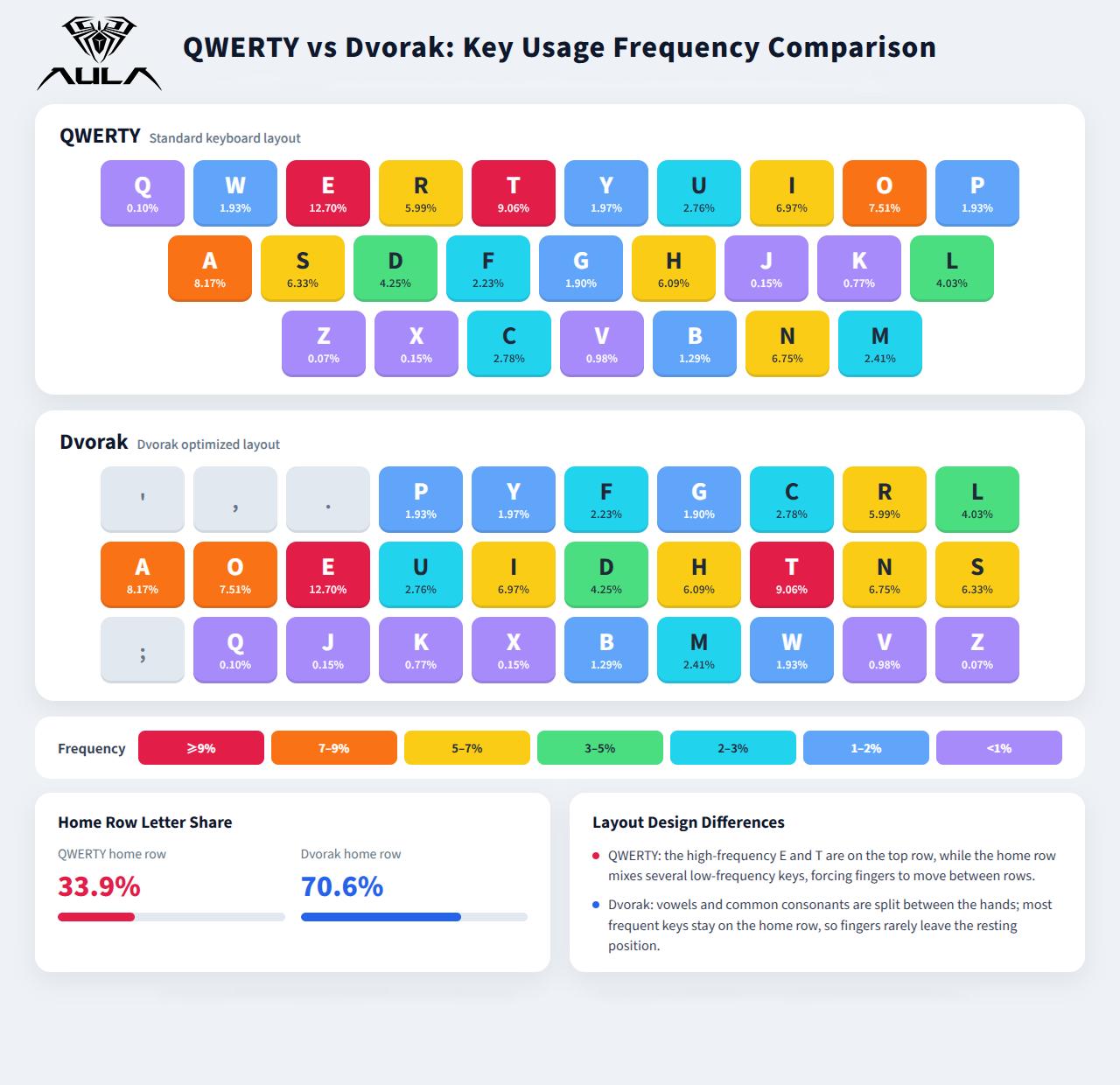
| Keystrokes on Home Row | ~32% | ~70% |
| Learning Cost | None (system default) | Usually 4–8 weeks to regain original typing speed |
| Core Design Strength | Global universal adoption, outstanding compatibility | Shorter finger travel, balanced workload between left and right hands |
| Proven Speed Gain | Barely measurable, only single-digit percentage at best | Same as above |
| Best For | The vast majority of users | People who type intensively for long hours, those prone to wrist strain, keyboard enthusiasts |
2. QWERTY: Popular Not Because It Is Ergonomic, But Because It Came First
QWERTY originated in the era of mechanical typewriters. Type bars struck upward onto paper. If frequently used letters sat next to each other, they would collide and jam mid stroke. Designers deliberately separated high frequency letters and placed many away from the home row.
QWERTY did not win out for superior typing efficiency — it won the battle of market saturation:
· It is the default layout on nearly every device: keyboards, smartphones, cash registers, aviation control systems and more.
· All hotkeys, user manuals and software interfaces are built around QWERTY.
Its trade offs: common letters are scattered, forcing longer finger movement. Workload is uneven, and the left hand tends to fatigue faster.
3. Dvorak: Impressive On Paper, Compromised In Real Use
Dvorak takes the opposite approach: it groups frequently used vowels and consonants onto the home row, encouraging alternating keystrokes between hands and preventing one side from being overloaded.
Its clear advantages: finger travel is reduced by roughly 30–40%. After hours of continuous typing, soreness in wrists and knuckles is noticeably lighter.
Yet it carries notable real world downsides. It takes weeks of consistent practice to get back to your original speed. Using someone else’s computer or letting others use yours becomes awkward. Multiple studies confirm the speed improvement is only a small single digit percentage.
4. Why The Gap Is Smaller Than You Expect
The limiting factor is not layout design, but typing itself. What usually slows you down is thinking of what to type next and maintaining steady hand control. A keyboard layout only optimizes how your fingers move — it cannot make your brain generate ideas faster.
Switching layouts may feel more comfortable, but it will not guarantee faster typing.
5. Who Should Switch Layouts
Good candidates:
· People who type several hours daily and already experience finger or wrist fatigue
· Keyboard hobbyists willing to invest weeks into adaptation
Not recommended:
· Those still mastering QWERTY touch typing: polishing your blind typing skill brings far better returns than switching layouts
· Anyone who regularly uses shared or public computers
6. Final Trade Off
Dvorak holds the ergonomic edge, but this advantage mainly translates to comfort rather than raw typing speed. QWERTY’s enduring strength is its massive ecosystem and minimal friction.
For most people, mastering stable QWERTY touch typing yields greater benefits than switching layouts. Only heavy typists suffering from persistent hand fatigue should seriously consider Dvorak.