What Is a 75% Mechanical Keyboard?
Mechanical keyboards come in different sizes, and choosing the right layout can make a noticeable difference to both desk space and everyday use. Among the available options, the 75% mechanical keyboard has become a popular choice for users who want a compact design without giving up too many keys.
But what exactly does 75% mean? How does this layout compare with 60%, 65%, and TKL keyboards? And is it suitable for gaming as well as office work?
This guide explains the 75% keyboard layout, its practical advantages and limitations, and several options from AULA.
What Is a 75% Mechanical Keyboard?
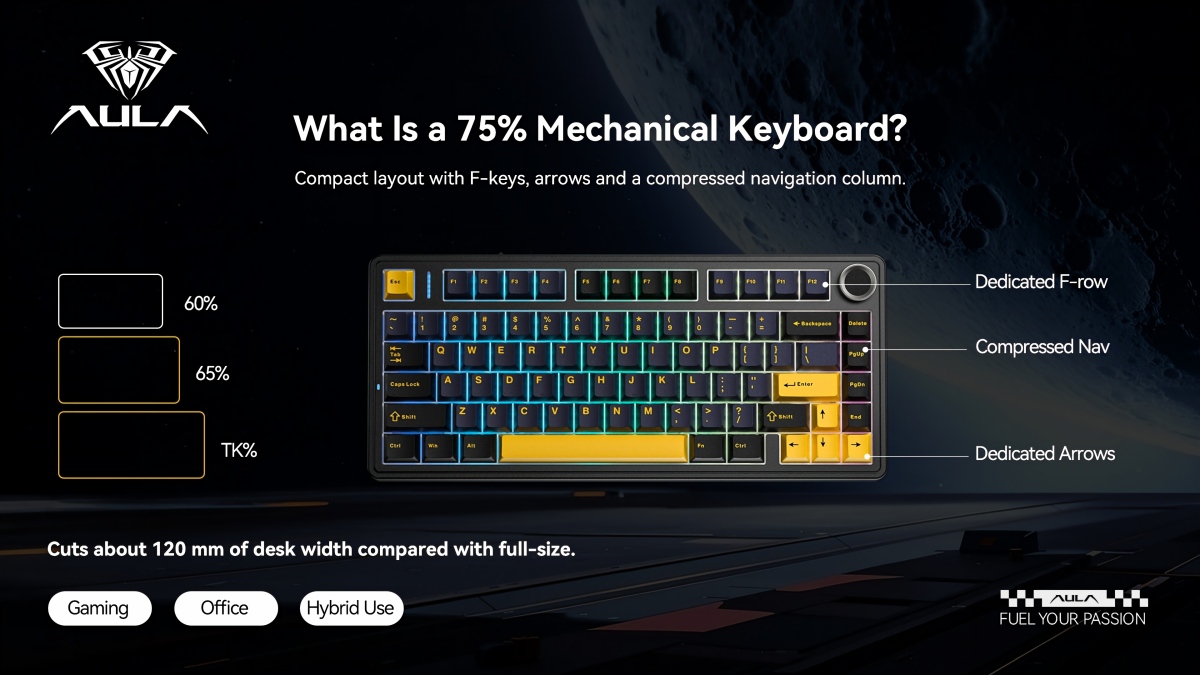
A 75% mechanical keyboard is a compact keyboard layout that keeps most of the keys people use regularly while removing the separate numeric keypad. Most models have approximately 80–84 keys, although the exact number depends on the manufacturer and layout.
Unlike a traditional full-size keyboard, a 75% layout places the main typing area, function row, arrow keys, and selected navigation keys closer together. This reduces the overall width without removing the function row or dedicated arrow keys.
For users who regularly switch between typing, gaming, and everyday computer tasks, this arrangement offers a practical balance between size and functionality.
How Is the 75% Layout Arranged?
A typical 75% keyboard includes:
Alphanumeric keys: The standard letters, numbers, and punctuation keys used for everyday typing.
Function row: F1–F12 keys for shortcuts and system functions.
Arrow keys: Dedicated directional keys for navigation and gaming.
Navigation keys: Additional keys for page navigation and text editing, depending on the keyboard model.
No separate number pad: The numeric keypad found on full-size keyboards is removed to save desk space.
The keys are arranged more closely than on a full-size keyboard. This compact structure is one reason the layout appeals to users who want more room for mouse movement or a cleaner desktop setup.
Why Do Gamers Choose a 75% Keyboard?
For gaming, keyboard size is not just a matter of appearance. It can affect how much room is available for mouse movement, how easily players reach important keys, and how comfortable the overall setup feels.
A 75% gaming keyboard addresses several of these needs.
1. More Room for Mouse Movement
A full-size keyboard takes up considerable horizontal desk space, particularly when used alongside a large mousepad. Removing the number pad makes the keyboard narrower, leaving more room for mouse movement.
This can be useful for FPS players who prefer lower mouse sensitivity and need a wider movement area.
2. Dedicated Arrow Keys and Function Keys
Smaller layouts often remove keys that some users still need. A 60% keyboard, for example, generally does not provide a dedicated function row or separate arrow-key cluster.
A 75% keyboard retains these key groups, making it easier to navigate documents, use shortcuts, and access function commands without relying as heavily on key combinations.
3. Suitable for More Than Gaming
Many gamers also use the same computer for work, study, or content creation. The 75% layout provides a more familiar typing arrangement than extremely compact keyboards.
Its combination of a smaller footprint and useful dedicated keys makes it suitable for mixed-use setups.
75% vs 65% vs 60% vs TKL: What Is the Difference?
Keyboard layouts are often described by percentages, but these figures are approximate size categories rather than exact measurements. The main difference is the number and arrangement of keys.
60% Keyboard
A 60% keyboard is one of the most compact mechanical keyboard layouts. It generally has around 61 keys and removes the dedicated function row, arrow keys, and navigation cluster.
Its small footprint is attractive for minimalist desks and portable setups. However, users may need to rely on function-layer combinations to access certain commands.
65% Keyboard
A 65% keyboard usually has approximately 67–68 keys. It retains dedicated arrow keys while removing the function row and most navigation keys.
This layout offers more direct navigation than a 60% keyboard but remains smaller than a 75% model.
75% Keyboard
A 75% keyboard generally has around 80–84 keys. It keeps the function row, arrow keys, and selected navigation keys in a compact arrangement.
For users who want to reduce keyboard width without losing frequently used keys, this layout is a practical middle ground.
TKL Keyboard
A TKL, or tenkeyless keyboard, typically has around 87 keys. It removes the number pad but retains a more traditional arrangement of the function and navigation keys.
Compared with a 75% keyboard, a TKL model usually has a wider layout because its key groups are spaced more conventionally.
Full-Size Keyboard
A full-size keyboard usually has approximately 104–108 keys, depending on the regional layout. It includes the main typing area, function row, navigation keys, arrow keys, and a dedicated numeric keypad.
This layout is useful for users who frequently enter numbers, work with spreadsheets, or prefer a traditional keyboard arrangement.
What Are the Advantages and Disadvantages of a 75% Keyboard?
A 75% layout is versatile, but it is not necessarily the right choice for everyone. Its suitability depends on which keys you use and how much desk space you have.
Advantages
Compact footprint: Removing the number pad reduces the keyboard's overall width.
Dedicated function row: Users can access F1–F12 directly.
Separate arrow keys: Navigation remains convenient for gaming, browsing, and document editing.
Balanced functionality: It keeps many of the keys found on larger keyboards without taking up as much space.
Suitable for different setups: It can work well in gaming rooms, home offices, and shared workspaces.
Limitations
No dedicated number pad: Users who frequently enter numerical data may prefer a full-size keyboard.
More compact key arrangement: Some users may need time to adjust to the closer spacing of certain key groups.
Different layouts between models: The exact number and position of navigation keys can vary by manufacturer.
Before choosing a model, it is worth checking its actual key layout rather than relying only on the 75% label.
Is a 75% Keyboard Good for Work and Gaming?
A 75% mechanical keyboard can serve both purposes, provided its switches, key feel, connectivity, and software meet the user's requirements.
For gaming, dedicated arrow keys and the function row provide convenient access to commonly used controls. A compact width also leaves more room for mouse movement.
For office work, the layout retains the keys needed for everyday typing, shortcuts, and navigation. Users who work extensively with spreadsheets or numerical data, however, may find the absence of a number pad inconvenient.
For shared work and gaming setups, a 75% keyboard can reduce the need to switch between different keyboards.
How to Choose a 75% Mechanical Keyboard
The layout is only one part of the buying decision. Switch technology, construction, connectivity, and software can all affect the typing and gaming experience.
1. Choose the Right Switch Type
Traditional mechanical switches use physical contacts to register keystrokes. They are available in different actuation feels, including linear, tactile, and clicky options.
Hall Effect keyboards use magnetic switches and sensors to detect key movement. Depending on the model, users may be able to adjust actuation points and use features such as Rapid Trigger.
For users interested in customizable key response, a Hall Effect keyboard may be worth considering.
2. Check Rapid Trigger and Actuation Settings
Rapid Trigger is a feature commonly found on magnetic-switch keyboards. Instead of relying on a fixed reset point, it allows a key to reset based on its movement.
This can be useful in games that require repeated directional inputs or quick changes in movement.
When comparing models, check the supported actuation range, adjustment precision, and software controls. A smaller adjustment increment does not automatically guarantee better performance in every game.
3. Consider Polling Rate and Connectivity
Polling rate describes how frequently a keyboard reports input to the connected device. A higher polling rate can reduce the interval between reports, although the actual benefit depends on the computer, game, and connection method.
Some AULA F75 HE configurations specify up to 8000Hz over USB, 1000Hz over 2.4GHz wireless, and 125Hz over Bluetooth. These figures are connection-specific, so users should check the specifications for the exact version they intend to purchase.
4. Pay Attention to Typing Feel and Construction
The internal structure affects sound, key feel, and overall typing comfort. Some keyboards use gasket-mounted structures, flexible plates, and multiple sound-dampening layers to change the feel and sound of keystrokes.
Keycap material is another consideration. PBT keycaps are often selected for their textured feel and resistance to the shine that can develop with extended use.
5. Look at Software Support
Keyboard software may provide key remapping, lighting customization, macro settings, and performance adjustments. For Hall Effect models, software can also be important for configuring actuation points and Rapid Trigger behavior.
Before buying, check whether the software supports the operating system and functions you need.
Explore AULA 75% Mechanical Keyboards
AULA offers several keyboards in the 75% category, covering conventional mechanical switches, magnetic-switch technology, and premium construction. Although they share a compact layout, their features serve different user preferences.
AULA F75: A Mechanical Keyboard for Everyday Use
The AULA F75 is a conventional mechanical keyboard with an 80-key layout. Its construction combines a leaf-spring gasket structure, slotted PC plate, and five-layer sound-dampening design.
Other features include:
PBT keycaps
Aluminum volume knob
4000mAh battery
Compact 75% layout
For users who want a compact mechanical keyboard for everyday typing and gaming, the F75 provides a combination of familiar mechanical-switch operation and a space-saving layout.
AULA F75 HE: Magnetic Switches and Adjustable Input
The F75 HE uses magnetic switches and adds features intended for users who want more control over key response.
Its main specifications include:
80-key layout
Magnetic switches
Rapid Trigger adjustment down to 0.01mm
Up to 8000Hz polling rate through USB
Up to 1000Hz through 2.4GHz wireless
125Hz through Bluetooth
Five-layer sound-dampening structure
AULA HUB software support
The adjustable input settings make this model relevant to players who want to configure key response for different games. Its tri-mode connectivity also provides flexibility across wired and wireless setups.
AULA HERO 75 HE: Fine-Tuned Magnetic Input
The HERO 75 HE is another magnetic-switch option in AULA's compact keyboard range. It has an 84-key layout and focuses on adjustable input response.
Key features include:
Hall Effect magnetic switches
Rapid Trigger adjustment down to 0.005mm
Adjustable actuation range from 0.1mm to 3.4mm
Up to 8000Hz polling rate
Tri-mode connectivity
Five-layer sound-dampening structure
36-LED RGB lightbox
Its adjustable actuation settings allow users to configure how far a key needs to travel before registering an input. The model may appeal to gamers who want more detailed control over keyboard response.
AULA NEOS75: CNC Aluminum Construction
The NEOS75 takes a different approach, combining a compact layout with a CNC-machined aluminum case and a low-profile switch design developed through the AULA and Kailh collaboration.
Its main features include:
84-key layout
CNC aluminum construction
Custom low-profile AULA × Kailh switches
Six-layer acoustic structure
2.3-inch display
4200mAh battery
1000Hz polling rate through wired and 2.4GHz connections
A HUB 3.0 and VIA support
The aluminum construction and integrated display give this model a different character from the more conventional F75 series. It is an option for users who place importance on case materials, desktop appearance, and customization.
Which AULA 75% Keyboard Should You Choose?
The right model depends on how you plan to use the keyboard.
For everyday typing and general gaming: The AULA F75 offers a conventional mechanical keyboard experience with a compact layout.
For adjustable magnetic input: The F75 HE provides magnetic switches and Rapid Trigger functionality.
For more precise input customization: The HERO 75 HE offers a finer Rapid Trigger adjustment increment and an adjustable actuation range.
For premium case construction: The NEOS75 combines CNC aluminum construction, low-profile switches, and an integrated display.
Rather than choosing solely by the model name or polling-rate figure, compare the switch technology, connectivity, construction, software support, and layout details that matter to your setup.
Final Thoughts:
A 75% mechanical keyboard offers a useful balance between compact dimensions and everyday functionality. It removes the number pad to save desk space while retaining the function row, arrow keys, and selected navigation keys.
For gamers, this can mean more room for mouse movement without sacrificing commonly used keys. For office users, it provides a familiar typing arrangement in a smaller footprint, although people who rely on a dedicated number pad may prefer a full-size model.
AULA's F75, F75 HE, HERO 75 HE, and NEOS75 cover different preferences, from conventional mechanical switches to magnetic input customization and CNC aluminum construction. Comparing their actual features and intended use is the best way to find a 75% keyboard that fits your setup.