Keyboard Structure Explained
A mechanical keyboard may look simple from the outside, but its internal construction has a significant influence on how it feels and sounds. Two keyboards equipped with the same switches can produce very different typing experiences because their plates, mounting systems, foam layers, and cases are not necessarily the same.
Understanding mechanical keyboard structure makes it easier to see why these differences occur. From the keycaps at the top to the PCB and mounting system underneath, every component contributes something to the overall design.
This guide explains the main mechanical keyboard parts, how different structural configurations affect typing feel and sound, and how AULA combines these elements in several of its keyboard models.
What Is a Mechanical Keyboard Structure?
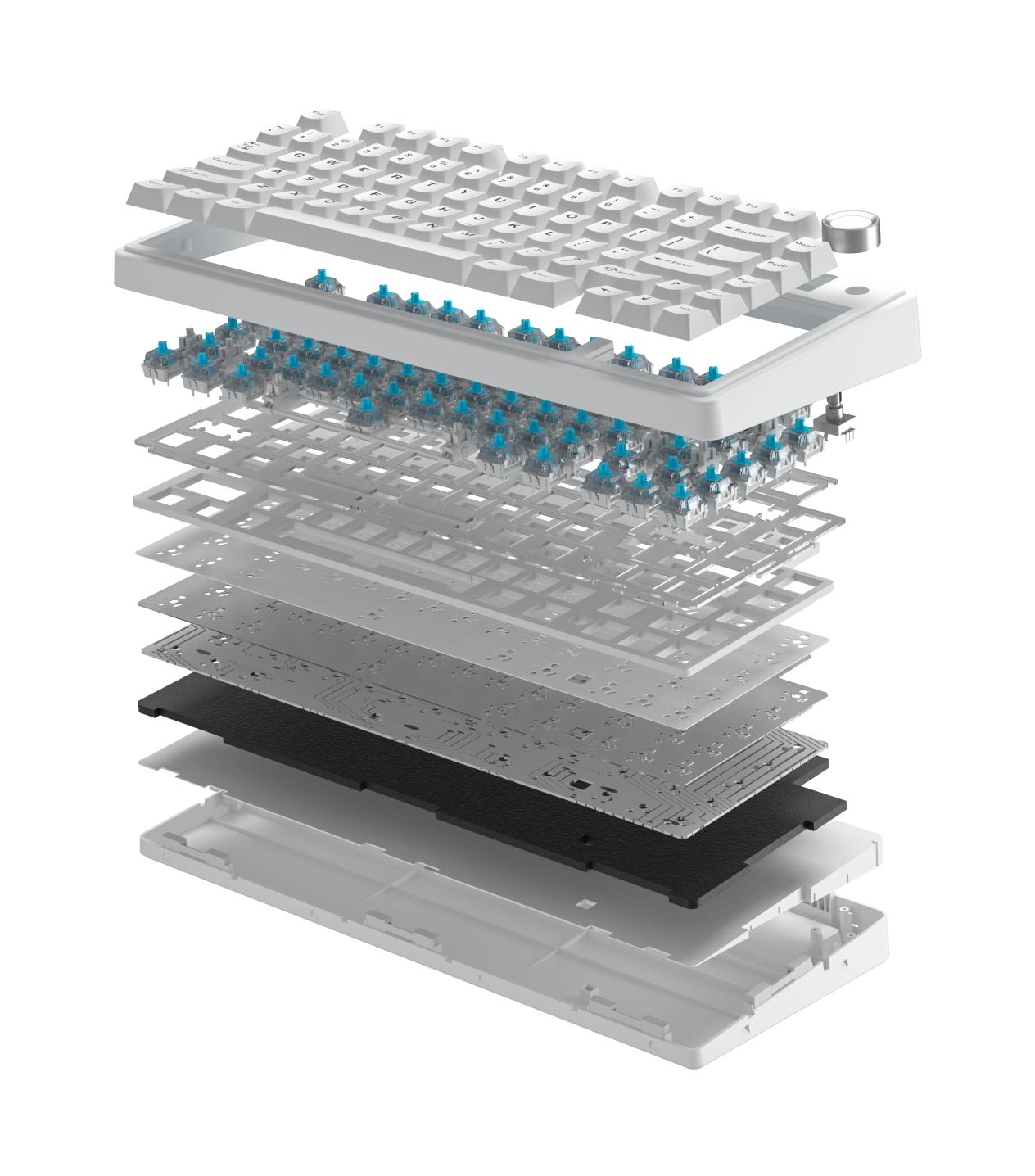
A mechanical keyboard is built from several layers. Starting at the top, the keycaps sit on the switches, which are installed in a positioning plate and connected to a printed circuit board (PCB). The plate and PCB assembly is then supported by a mounting system inside the case.
Additional materials, including foam, films, and silicone pads, may be placed between these components to control vibration and internal resonance.
Each part has a different purpose. Keycaps influence surface feel and sound, switches determine actuation characteristics, and the plate affects rigidity and impact feedback. The PCB handles the electrical functions, while the mounting style determines how the internal assembly is supported. Dampening materials help control the sound produced inside the case.
This explains why two mechanical keyboards with identical switches can feel completely different. A rigid plate attached directly to the case transfers more impact energy into the housing. A gasket-mounted design with silicone support and additional dampening layers allows more movement and absorbs some of that energy.
In other words, the overall keyboard structure determines how vibration travels through the keyboard, which ultimately affects both typing feel and sound.
Main Components of a Mechanical Keyboard
To understand how a mechanical keyboard works, it helps to look at its main components individually. Although each part has its own function, the final typing experience comes from how all these layers work together.
1. Keycaps: Material, Thickness and Profile
Keycaps are the parts users touch directly. Their material, wall thickness, and profile influence both the typing experience and the sound produced when a key is pressed.
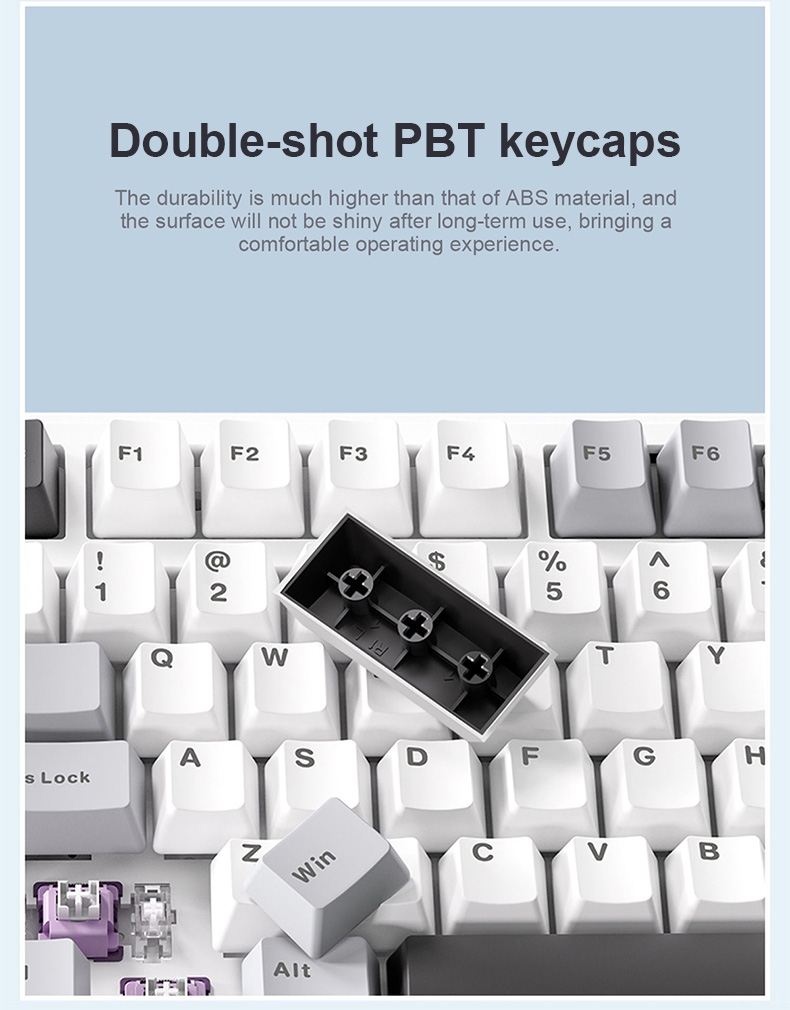
PBT and ABS are two common keycap materials, but they have different characteristics. PBT is relatively dense, resists surface shine, and generally maintains a dry texture after extended use. ABS is lighter and tends to develop a glossy surface through repeated contact.
The manufacturing method also matters. Double-shot molding creates legends as part of the keycap structure, helping prevent characters from wearing away. Pad-printed and laser-etched legends may show more visible wear over time, depending on their construction.
Thickness and profile also influence the result. Thicker keycaps add mass and can reduce some vibration, while taller profiles create a larger space beneath each cap. Different profiles, including OEM, Cherry, and SA, therefore produce different sound characteristics.
| Keycap Factor | PBT | ABS | General Effect |
|---|---|---|---|
| Density | Generally higher | Generally lower | Influences sound and impact |
| Surface over time | Resists shine | May develop shine | Affects long-term surface feel |
| Sound character | Often deeper and more muted | Often brighter | Changes the overall keyboard sound |
| Molding | Double-shot available | Double-shot available | Helps legends resist fading |
| Profile | OEM, Cherry, SA, and others | Similar range | Changes key height and sound chamber |
Keycaps are not limited to plastic. Some premium keyboards also use CNC-machined aluminum keycaps, which have a different weight and resonance profile from conventional PBT and ABS designs.
2. Mechanical Keyboard Switches
Switches determine how a key responds when pressed. Their actuation characteristics have a direct effect on typing feedback, travel feel, and sound.
Mechanical switches generally fall into three familiar categories:
Linear switches: Move smoothly without a noticeable tactile bump or dedicated click mechanism. They are commonly used in gaming keyboards and by people who prefer uninterrupted key travel.
Tactile switches: Provide a noticeable bump during the keypress, giving users physical feedback when the switch actuates.
Clicky switches: Combine tactile feedback with an audible click, making them suitable for users who prefer more pronounced sound and feedback.
The way switches detect a keypress is another important distinction. Conventional mechanical switches use physical metal contacts to register input. Hall Effect magnetic switches use magnetic field detection instead, allowing adjustable actuation points and features such as Rapid Trigger on compatible keyboards.
These two switch technologies are not interchangeable. A keyboard designed for Hall Effect switches cannot simply accept standard 3-pin or 5-pin mechanical switches through a firmware change.
Factory lubrication is another factor that affects switch performance. It can reduce spring noise, stem friction, and unwanted wobble. This is why two linear switches with similar specifications may still produce different typing experiences.
| Switch Type | Typing Feel | Main Sound Source | Typical Application |
|---|---|---|---|
| Linear | Smooth, without a tactile bump | Mainly bottom-out | Gaming and fast typing |
| Tactile | Noticeable mid-travel feedback | Tactile bump and bottom-out | Typing and programming |
| Clicky | Tactile feedback with an audible click | Click mechanism and bottom-out | Users who prefer audible feedback |
3. Keyboard Plate Materials
The positioning plate is a structural layer between the switches and PCB. Its cutouts hold the switches in place, maintain alignment, and contribute to the overall rigidity of the keyboard.
Plate material is one of the factors that influences mechanical keyboard typing feel. Different materials have different levels of stiffness and internal damping, which affect how impact energy is transmitted through the keyboard.
Carbon fiber, brass, and steel are generally rigid options. Aluminum also provides a firm structure, while FR4, POM, and polycarbonate (PC) offer different degrees of flexibility and vibration damping.
Rigid plates provide a more direct bottom-out response. Softer materials can absorb more impact energy and produce a more cushioned feel.
Carbon fiber: Offers high rigidity with relatively low weight, producing a crisp and direct response.
Brass and steel: Provide a very firm structure and can create a bright sound with noticeable metallic resonance.
Aluminum: Offers a balance of rigidity, weight, and consistent switch support.
FR4: A fiberglass-based material that provides moderate stiffness and relatively balanced sound characteristics.
POM: Has softer characteristics and is often associated with a deeper, more muted sound.
PC: Provides greater flexibility and damping, creating a softer and more elastic typing experience.
Some keyboards also use flex cuts or slots in the plate to increase movement. Others use a plate-free structure, mounting switches directly to the PCB. This can create a softer feel, although structural stability needs to be considered.
| Plate Material | General Stiffness | Sound Character | Typing Feel |
|---|---|---|---|
| Carbon fiber | Very high | Crisp and clean | Firm and direct |
| Brass / Steel | Very high | Bright, potentially metallic | Very firm |
| Aluminum | High | Clean and balanced | Firm and precise |
| FR4 | Medium | Clear and relatively neutral | Slight flexibility |
| POM | Soft | Deep and muted | Cushioned |
| PC | Soft | Rounded and relatively quiet | Flexible and bouncy |
4. Mechanical Keyboard PCB
The PCB is the circuit board responsible for registering keypresses and communicating with the connected device. It carries the switch matrix, controller, firmware, lighting components, and power connections.
Features such as N-key rollover, per-key RGB lighting, QMK or VIA compatibility, and polling rate are associated with the electronic design rather than the physical mounting structure.
One important PCB design choice is how switches are installed.
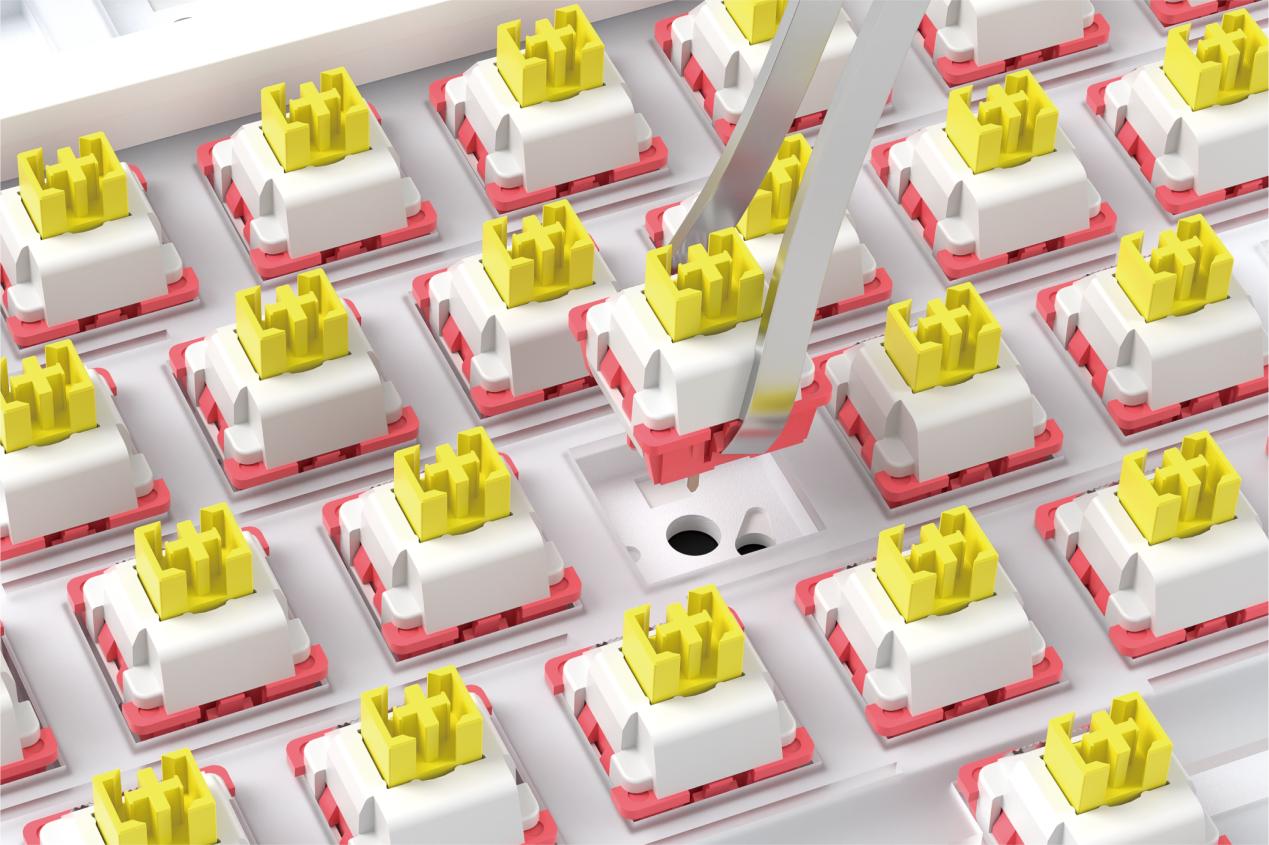
A hot-swappable mechanical keyboard uses sockets that allow compatible switches to be removed and replaced without soldering. This makes it easier to experiment with different switch types or customize the typing experience.
Soldered PCBs connect switches directly to the board. Although replacing switches requires soldering equipment, this construction can support more specialized layouts, including split spacebars and stepped Caps Lock configurations.
Some PCBs also include flex cuts or slots around individual switch positions. These openings allow more movement in selected areas and can make the bottom-out feel softer.
It is worth distinguishing PCB flexibility from polling rate. A flexible PCB does not necessarily have a lower reporting rate. These are separate design considerations.
| PCB Design | Main Consideration | Main Benefit |
|---|---|---|
| Hot-swap sockets | Socket compatibility | Easy switch replacement |
| Soldered PCB | Requires soldering for changes | Supports specialized layouts |
| Flex-cut PCB | Reduced rigidity | More flexibility |
| Standard PCB without cuts | Less structural movement | Firm and consistent support |
5. Keyboard Dampening Foam and Internal Materials
The empty space inside a keyboard case can create unwanted resonance. This is why many mechanical keyboards use foam, silicone pads, or acoustic films between structural components.
These materials do more than simply make a keyboard quieter. Their position and physical properties determine which vibrations are absorbed and which are reflected.
Common materials include PORON, IXPE, PET, silicone, EVA, and felt.
PORON is often used between the plate and PCB or near the bottom of the case. It absorbs some internal resonance and contributes to a deeper, more muted sound.
IXPE is commonly used as a switch pad. It helps change the contact characteristics around the switches while retaining much of their individual sound character.
PET acoustic film behaves differently from absorbent foam. Rather than simply absorbing sound, it reflects and concentrates certain higher-frequency components, which can create a brighter and more focused sound.
Silicone pads are often placed at the bottom of the case to fill internal space and reduce unwanted case resonance.
However, adding more foam does not always improve a keyboard. Excessive filling can restrict the movement needed by a gasket-mounted assembly, making the keyboard feel stiff instead of flexible.
| Material | Common Position | Main Function | General Sound Effect |
|---|---|---|---|
| PORON | Plate sandwich and bottom foam | Reduces internal resonance | Deeper and more muted |
| IXPE | Under switches | Changes impact characteristics | Cleaner and crisper |
| PET | Acoustic film or pad | Reflects and concentrates higher frequencies | Brighter and more focused |
| Silicone | Bottom of the case | Fills internal space | Reduces case echo |
| EVA / Felt | Basic foam layers | Fills gaps | Provides basic dampening |
6. Keyboard Mounting Styles: Gasket Mount, Tray Mount and More
The mounting system determines how the plate and PCB assembly is supported inside the case. It is one of the most important elements when comparing different mechanical keyboard structures.
A gasket mount suspends the plate and PCB assembly using silicone, PORON, or rubber pads rather than attaching it directly to the case with screws. When a key is pressed, the assembly can move slightly, allowing the gaskets to absorb part of the impact.
This often creates a softer typing experience and a more controlled sound.
A tray mount uses screws to secure the PCB to mounting points in the bottom case. It is a relatively straightforward construction, usually producing a firmer feel.
A top mount secures the assembly to the upper part of the case. It offers another approach to structural support, while leaf-spring gasket designs use flexible tabs in the plate to provide additional movement.
It is important to remember that a gasket mount does not automatically guarantee a soft typing feel. Gasket hardness, pad placement, plate material, and foam configuration all influence the final result.
| Mounting Style | How It Works | General Feel | Sound Character |
|---|---|---|---|
| Tray mount | PCB secured to bottom case standoffs | Rigid | Brighter |
| Top mount | Assembly secured to upper case | Firm and consistent | Moderately deep |
| Gasket mount | Assembly supported by soft pads | Cushioned and flexible | Lower-pitched |
| Leaf-spring gasket | Flexible plate tabs combined with pads | Elastic and responsive | Rounded and damped |
How Mechanical Keyboard Structure Affects Typing Feel
Typing feel is not determined by the switch alone. It comes from the combined effect of switch feedback, bottom-out impact, rebound, and overall structural firmness.
Switches and plates influence the feedback users feel during a keypress. A tactile switch on a rigid aluminum plate may feel sharp and direct, while the same switch on a softer PC plate can feel more rounded.
Bottom-out describes the moment when a key reaches the end of its travel. A rigid plate combined with a tray mount typically produces a firmer response. A softer plate with a gasket mount and suitable dampening materials can create a more cushioned result.
Rebound is also important. It depends partly on the elasticity of the mounting system and the flexibility of the plate. If too much foam is added, the assembly may lose some of its natural movement.
| Typing Feel | Main Structural Factors | How to Create a Softer Feel | How to Create a Firmer Feel |
|---|---|---|---|
| Press feedback | Switch type and plate stiffness | Softer plate materials | Rigid plate materials |
| Bottom-out | Plate, mount, dampening | Gasket mount and moderate foam | Tray mount and rigid plate |
| Rebound | Gasket elasticity and plate flex | Softer gaskets and fewer foam layers | Harder gaskets and denser materials |
| Overall firmness | Combined structure | Flexible plate with gasket support | Rigid plate with rigid mounting |
A useful way to understand this relationship is that the mounting system determines how the assembly is supported, the plate influences its response, and dampening materials change how much vibration reaches the case and the user's fingers.
Changing only one component without considering the rest of the keyboard structure may not produce the expected result.
How Mechanical Keyboard Structure Affects Sound
The sound of a mechanical keyboard is the result of several components interacting. Switches generate the initial sound, while keycaps, plates, mounting systems, and internal materials change how that sound travels through the keyboard.
Enthusiasts often use terms such as thock, clack, hollow, ping, rattle, and muted to describe different sound characteristics. These are descriptive terms rather than standardized acoustic measurements. The same keyboard may also sound different depending on the desk surface, room, and recording equipment.
Understanding the structural causes behind these sounds is more useful than trying to achieve a particular sound through one modification.
| Sound Description | Related Components | Common Cause | Possible Adjustments |
|---|---|---|---|
| Thock | Switches, keycaps, foam and mount | Lower frequencies remain prominent while some higher frequencies are absorbed | Linear switches, thick PBT caps, PORON and gasket mounting |
| Clack | Switches, plate and keycaps | Hard contact surfaces preserve higher frequencies | Rigid plates, fewer foam layers and suitable switches |
| Hollow | Case and internal space | Empty cavities allow sound to resonate | Add suitable case foam and reduce unwanted empty space |
| Ping | Springs, plates and metal components | Metal parts produce lingering high-frequency vibration | Lubricate springs or adjust plate and dampening choices |
| Rattle | Stabilizers and assembly tolerances | Loose components create additional noise | Tune stabilizers and check component fit |
| Muted | Foam, silicone and case structure | Absorbent materials reduce resonance | Use suitable PORON and silicone layers |
Two distinctions are particularly useful. First, a deep thock sound usually comes from several components working together rather than one specific material. Second, a quiet keyboard is not necessarily a thock keyboard. Too much dampening can make a keyboard quiet but flat, while a well-balanced design retains a more defined sound.
When diagnosing unwanted noise, it helps to identify where it comes from. A hollow sound may be related to the case cavity, while metallic ping may come from springs or the plate. Noise limited to the spacebar or Shift key may point to stabilizers rather than the switches themselves.
How to Choose the Right Mechanical Keyboard Structure
There is no single best mechanical keyboard structure for every user. The right configuration depends on whether the priority is a soft typing experience, clear feedback, a particular sound profile, or the ability to customize components.
Here are four common preferences and the structural features associated with them.
| User Preference | Structure to Consider | What to Avoid | Why |
|---|---|---|---|
| Soft and cushioned typing | Gasket mount, PC / FR4 / POM plate, moderate foam | Overly rigid plates and excessive filling | Allows controlled movement and impact absorption |
| Crisp feedback | Tactile or clicky switches, aluminum or carbon fiber plate | Excessive dampening | Preserves a more direct response |
| Deep, low-pitched sound | Linear switches, thick PBT caps, PORON and silicone | Empty plastic cases and unsuitable ABS caps | Helps reduce unwanted resonance |
| DIY customization | Hot-swap PCB, removable plate and accessible foam | Soldered switches and permanently fixed layers | Makes component changes easier |
These combinations are starting points rather than guaranteed results. Desk material, switch lubrication, keycap construction, and other modifications can all change the final experience.
The intended environment matters too. A bright, clicky keyboard may suit personal gaming or typing preferences but can be distracting in a shared office. A more muted gasket-mounted keyboard may be a better fit for users who want to reduce surrounding noise.
AULA Mechanical Keyboard Designs: Three Different Structural Approaches
AULA uses different mechanical keyboard structures across its product range. The F75, BOX63, and NEOS75 provide useful examples of how mounting systems, plate materials, and dampening configurations can create distinct product characteristics.
The following specifications are based on the respective AULA official product information. Buyers should confirm the exact version and regional configuration before ordering.
AULA F75: Gasket Mount with a Multi-Layer Dampening Structure
The AULA F75 is a 75% gasket mechanical keyboard with 80 keys and tri-mode connectivity.
Its structure uses a leaf-spring gasket design with an integrated silicone pad. The positioning plate is made from slotted PC, while the PCB is a 1.2mm single-key slotted design. These choices support a more flexible internal structure.
The keyboard also uses a five-layer dampening configuration consisting of PORON silencer cotton, an 8-times-foamed IXPE switch pad, a PET acoustic pad, an open-mold silicone bottom pad, and PORON bottom cotton.
Double-shot PBT keycaps and factory-tuned stabilizers complete the construction. The PCB supports hot-swappable 3-pin and 5-pin mechanical switches.
The combination of PC plate material, gasket support, and multiple dampening layers makes the F75 a useful example of a keyboard designed around a softer and more controlled typing experience.
AULA BOX63: CNC Aluminum Case and Hall Effect Technology
The AULA BOX63 takes a different structural approach. It features a full CNC-machined aluminum case with a PVD mirror decorative panel and a 63-key layout.
Unlike conventional mechanical keyboards, it uses fourth-generation Hall Effect magnetic sensing. Its internal construction includes a soft silicone gasket mount, a four-layer double-sided copper PCB, a carbon fiber positioning plate, and five layers of sound-dampening material.
The BOX63 also supports 8K polling, Rapid Trigger precision down to 0.001mm, a 102-pixel display, and the AULA HUB driver.
One important distinction is switch compatibility. Because the BOX63 uses Hall Effect magnetic switches, it is not designed for standard mechanical switches. These two switch technologies should not be treated as interchangeable.
For sourcing purposes, buyers should also pay attention to regional specifications. Some third-party listings describe an FR4 plate and ten internal layers, while the official AULA page specifies a carbon fiber plate and five dampening layers. The official product information should be used as the primary reference, with the manual checked for the exact version being purchased.
AULA NEOS75: Low-Profile Design with Aluminum Keycaps
The AULA NEOS75 has a different appearance and construction from the other two models. It features a Neo-Renaissance-inspired design, a 75% layout with 84 keys, and a one-piece CNC aluminum chassis.
According to the official store, its six-layer gasket acoustic structure uses multiple PORON, IXPE, and PET layers. The keyboard also features AULA × Kailh custom low-profile switches and custom low-profile aluminum keycaps.
Other listed features include a 2.3-inch color display, a metal knob module, tri-mode connectivity, a 4200mAh battery, 1000Hz polling in wired and 2.4G modes, and A HUB 3.0 with VIA support.
The aluminum keycaps are particularly notable because their weight and resonance characteristics differ from conventional PBT and ABS keycaps. This makes the NEOS75 a useful example of how material selection can influence both the appearance and construction of a mechanical keyboard.
There is also a regional specification difference worth checking: a third-party database records five filling layers for the domestic version, while the official international store specifies six. Buyers should confirm the configuration of the version they intend to purchase.
Comparing the Three AULA Keyboard Structures
| Specification | AULA F75 | AULA BOX63 | AULA NEOS75 |
|---|---|---|---|
| Layout | 75%, 80 keys | 63 keys | 75%, 84 keys, low-profile |
| Case | Standard housing | Full CNC aluminum, PVD panel | One-piece CNC aluminum |
| Mount | Leaf-spring gasket with silicone pad | Soft silicone gasket | Gasket, six-layer acoustic structure |
| Plate | Slotted PC | Carbon fiber | Not specified on official page |
| PCB | 1.2mm single-key slotted | Four-layer, double-sided copper | Not specified on official page |
| Dampening | Five layers | Five layers | Six layers |
| Keycaps | Double-shot PBT | Not detailed on official page | Custom low-profile aluminum |
| Switches | Hot-swap, 3-pin / 5-pin mechanical | Hall Effect magnetic | AULA × Kailh low-profile, hot-swap |
| Polling rate | 1000Hz wired and 2.4G | 8K | 1000Hz wired and 2.4G |
| Connectivity | Bluetooth / 2.4G / USB-C | Wired | Bluetooth / 2.4G / USB-C |
| Software | AULA software | AULA HUB | A HUB 3.0 / VIA |
These three keyboards demonstrate that there is no universal formula for mechanical keyboard design. The F75 combines a flexible PC plate with gasket support and multiple dampening layers. The BOX63 pairs a CNC aluminum case with a carbon fiber plate and Hall Effect switches. The NEOS75 uses a low-profile structure with aluminum keycaps.
Each design makes different trade-offs in materials, internal construction, and typing experience.
For readers interested in the BOX63's 8K polling rate, see the separate discussion of whether an 8K polling rate is worth it for gaming. Polling rate describes how frequently a keyboard reports input to a connected device; it is an electronic performance specification rather than a physical structural feature.
Final Thoughts on Mechanical Keyboard Structure
A mechanical keyboard is more than a collection of switches and keycaps. Its plate, PCB, mounting system, dampening materials, and case all influence how the keyboard performs.
Understanding these mechanical keyboard components makes it easier to compare different designs and identify the structural features behind a particular typing feel or sound profile.
For users choosing a new keyboard, the best approach is to consider the complete construction rather than focusing on one specification. For gaming peripheral brands and buyers, comparing these structural details also provides a clearer understanding of how different keyboard models meet different user preferences.
AULA's F75, BOX63, and NEOS75 illustrate how different combinations of materials and internal structures can create distinct mechanical keyboard designs.