60% vs 65% vs 75% Keyboard: Which Layout Is Right for You?
Your desk space is limited, but your mouse needs room to move. If your current keyboard feels too wide, especially when playing games that require large or low-sensitivity mouse movements, switching to a compact keyboard may seem like the obvious solution.
A 60% keyboard looks appealing at first. It takes up less desk space, creates a cleaner setup, and gives you more room for mouse movement. But once you start using it, you may notice something unexpected: where are the arrow keys? How do you access Home, End, or the function keys without pressing Fn combinations?
That is why choosing between a 60%, 65%, and 75% keyboard is not simply about finding the smallest option. Each keyboard layout offers a different balance of desk space, key accessibility, and everyday convenience. The right choice depends on how you play, work, and use your computer throughout the day.
Why Does Keyboard Size Matter?
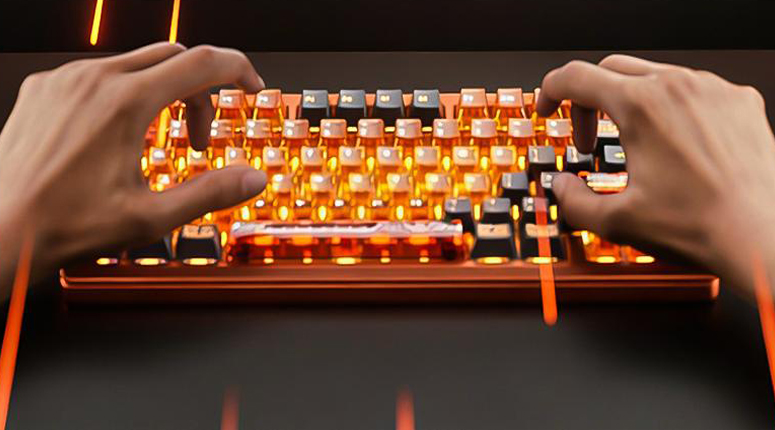
A compact gaming keyboard can make a noticeable difference to your desk setup. By reducing the keyboard's footprint, you can create more room for mouse movement, keep your workspace organized, and build a setup that feels less crowded. This is particularly useful for FPS players who prefer lower mouse sensitivity and need more room for broad aiming movements.
However, a smaller keyboard also means fewer dedicated keys. Depending on the layout, you may need to use secondary key combinations to access arrow keys, function keys, or navigation controls. These shortcuts are manageable once you become familiar with them, but they can interrupt your workflow if you frequently switch between gaming, typing, browsing, and productivity tasks.
The goal is not to remove as many keys as possible. It is to choose a compact keyboard layout that gives you enough mouse space without making everyday use unnecessarily complicated.
60% Keyboard: Maximum Desk Space for Minimalist Setups
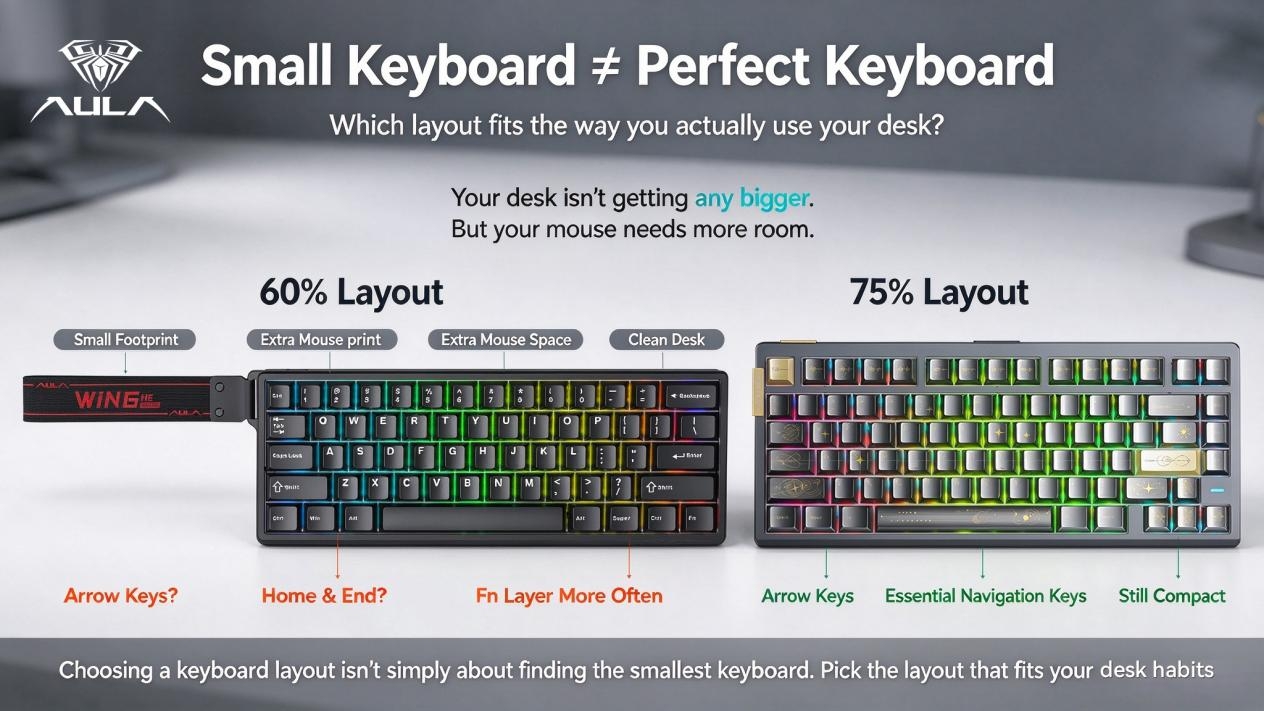
A 60% keyboard is designed for users who want to minimize the space their keyboard occupies. It retains the main typing area and essential modifier keys while removing dedicated arrow keys, the function row, and most navigation keys.
For gaming-focused users, this compact design offers several advantages:
More mouse space: A smaller keyboard leaves additional room for wide mouse movements, particularly in FPS games.
A minimal desk setup: The reduced footprint works well on small desks and clean gaming setups.
A focused layout: Frequently used gaming keys remain within easy reach.
A compact form factor: It is a practical option when desk space or portability is a priority.
The trade-off is accessibility. Arrow keys, Home, End, and F1–F12 are generally accessed through an Fn layer or other secondary key combinations, depending on the keyboard. If you mainly play games using WASD and rarely use navigation shortcuts, this may not be a major issue. However, if you regularly edit documents, browse long pages, write code, or work with spreadsheets, relying on key combinations can become less convenient.
A 60% keyboard is therefore a strong choice for users who prioritize a minimal footprint and are comfortable adapting to a layered key layout.
Best for: Competitive gaming, small desks, minimalist setups, and users who prioritize maximum mouse space.
65% Keyboard: A Compact Layout Without Losing Arrow Keys
A 65% keyboard offers a practical alternative for users who want a smaller keyboard without giving up some of the keys they use most often. Compared with a typical 60% layout, it adds dedicated arrow keys and usually includes a small selection of navigation keys, while keeping the overall footprint compact.
This difference may seem minor, but it can make everyday use more comfortable. You can navigate documents, move through menus, and handle common tasks without relying on an Fn combination every time you need an arrow key.
For gamers, a 65% keyboard also preserves much of the desk-space advantage associated with compact layouts. You can keep your mouse area relatively open while retaining direct access to directional controls. The function row is generally still accessed through secondary combinations, so users who frequently rely on F1–F12 should consider whether that limitation matters to their workflow.
This is where the 65% layout stands out: it removes unnecessary bulk while keeping certain everyday controls readily accessible. For users who find a 60% keyboard too restrictive but do not need all the keys available on a larger layout, it can be a sensible middle ground.
AULA BOX63: Rethinking the Compact Keyboard Experience
The AULA BOX63 brings a different perspective to the compact keyboard category. Rather than treating a smaller footprint as the only priority, its design focuses on making compact keyboard use more practical.
For users who want a streamlined gaming setup but are concerned about losing convenient access to frequently used functions, the BOX63 offers another option to consider. Its appeal lies in the idea that a compact keyboard should fit your desk without unnecessarily complicating the way you interact with your computer.
When comparing compact gaming keyboards, it is worth looking beyond the layout percentage alone. The physical key arrangement, secondary functions, and overall usability can all affect how comfortable a keyboard feels in daily use.
Best for: Users exploring compact keyboard designs who want to balance desk space with everyday usability.
75% Keyboard: A Better Balance of Gaming and Everyday Use
If you want a compact keyboard but do not want to give up too many dedicated keys, a 75% keyboard is worth considering. This layout keeps the arrow keys and a dedicated F1–F12 function row while arranging the keys more closely than a traditional larger keyboard.
That additional functionality becomes useful when your keyboard serves more than one purpose. You might play games in the evening, write emails the next morning, and spend the afternoon editing documents or working on a project. With a 75% keyboard, you can move between these activities without relying as heavily on secondary key combinations.
A 75% keyboard still saves desk space compared with a full-size keyboard, although it generally occupies more room than a 60% or 65% model. It also does not include a dedicated numeric keypad, which may matter if you regularly enter large amounts of numerical data.
For users who want a compact gaming keyboard that remains practical for work, study, and everyday computing, the 75% layout offers a well-rounded combination of size and functionality.
AULA F75 and HERO75 HE: Compact Layouts for Modern Gaming
The AULA F75 family offers options for users who prefer a 75% keyboard layout. By retaining the function row and dedicated arrow keys in a compact arrangement, this layout makes it easier to switch between gaming and daily tasks without sacrificing too much desk space.
For users interested in Hall Effect technology, the AULA F75 HE and HERO75 HE are also worth exploring. These models combine a familiar compact form factor with Hall Effect magnetic switch technology, offering another consideration for gamers evaluating their next keyboard.
The important point is that choosing a gaming keyboard involves more than comparing physical size. Layout, switch technology, key accessibility, and your preferred gaming style all contribute to the overall experience. A 75% keyboard can be a practical starting point if you want a compact setup without moving too far away from a familiar keyboard layout.
Best for: Gaming, work, study, and users who want a compact keyboard with more dedicated keys.
60% vs 65% vs 75% Keyboard: Key Differences at a Glance
When comparing a 60% vs 65% vs 75% keyboard, the most important differences are the keys each layout retains and how much desk space you are willing to use.
60% Keyboard
Overall footprint: Smallest
Dedicated arrow keys: Usually not included
Dedicated F1–F12 row: No
Navigation keys: Mostly accessed through Fn combinations
Mouse space: Maximum
Best for: Minimalist gaming setups and users who need maximum mouse space
Main trade-off: More reliance on Fn shortcuts
65% Keyboard
Overall footprint: Very compact
Dedicated arrow keys: Yes
Dedicated F1–F12 row: No
Navigation keys: Limited; varies by model
Mouse space: More than larger keyboard layouts
Best for: Users who want a compact keyboard for gaming and everyday use
Main trade-off: No dedicated function row
75% Keyboard
Overall footprint: Compact
Dedicated arrow keys: Yes
Dedicated F1–F12 row: Yes
Navigation keys: More accessible, depending on the model
Mouse space: More than a full-size keyboard
Best for: Gaming, work, and everyday productivity
Main trade-off: Takes up slightly more space than 60% and 65% layouts
Exact key counts and navigation-key arrangements vary by model, so check the manufacturer's layout diagram before buying.
The comparison highlights a simple principle: the smaller the keyboard, the more likely you are to rely on secondary functions. A larger compact keyboard layout gives you more direct access to frequently used keys, while a smaller one prioritizes desk space.
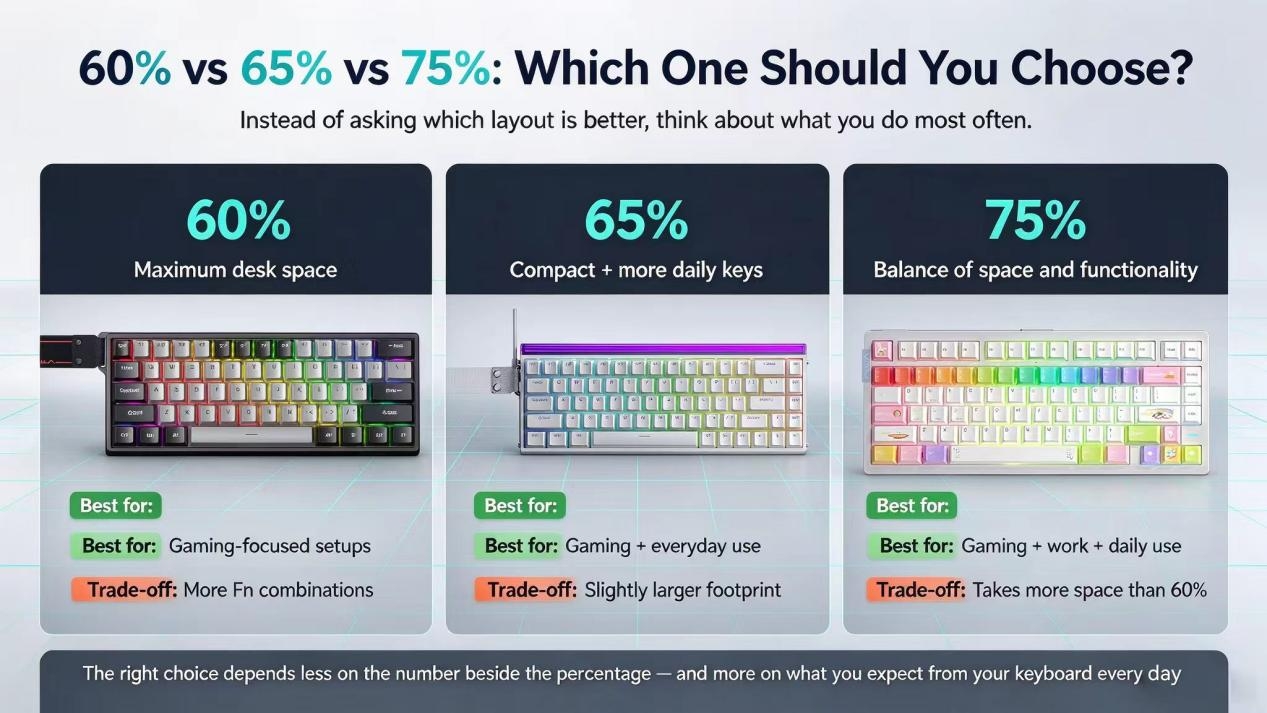
Which Keyboard Layout Is Right for You?
The best keyboard layout depends on your daily habits rather than the percentage printed in a product description. Before choosing a compact gaming keyboard, consider how much space you need, which keys you use most often, and whether gaming is your primary activity.
Choose a 60% Keyboard If You Prioritize Space
A 60% keyboard makes sense if you have a small desk, prefer a minimalist setup, or need as much room as possible for mouse movement. It is particularly suitable for players who mainly use their gaming keys and are comfortable accessing secondary functions through Fn combinations.
Choose a 65% Keyboard If You Want Compactness and Direct Arrow Keys
A 65% keyboard is a good option if you want to save space but still use dedicated arrow keys regularly. It suits users who play games, browse the web, and type throughout the day but do not frequently need a dedicated function row.
Choose a 75% Keyboard If You Need More Everyday Functionality
A 75% keyboard is worth considering if you use your keyboard for gaming as well as work, study, or content creation. The dedicated function row and arrow keys make common tasks more straightforward while preserving a compact footprint.
If you are still unsure, think about the keys you use most frequently. If you rarely touch the arrow or function keys, a 60% layout may be sufficient. If you use arrow keys regularly, a 65% layout provides more direct access. If you often use F1–F12 shortcuts or switch between gaming and productivity, a 75% keyboard may be the more convenient option.
Three Questions to Ask Before Buying a Compact Gaming Keyboard
1. How Much Mouse Space Do You Actually Need?
If your mouse frequently runs into your keyboard, switching to a smaller layout may help create a more comfortable setup. This is particularly relevant for players who use low mouse sensitivity and make broad arm movements when aiming.
However, do not assume that the smallest keyboard is automatically the best choice. Consider how much additional room you need and whether the difference between layouts is worth the functions you may lose.
2. How Often Do You Use Arrow and Navigation Keys?
Think about how frequently you use the arrow keys, Home, End, Page Up, Page Down, and F1–F12. If these controls are part of your everyday workflow, a 60% keyboard may require more adjustment than expected.
A 65% keyboard keeps dedicated arrow keys, while a 75% keyboard also retains the function row. Checking the exact layout before purchasing can help you avoid choosing a keyboard that looks compact but feels inconvenient to use.
3. Is Your Keyboard Mainly for Gaming?
If you primarily play games and rarely perform other keyboard-heavy tasks, a 60% or 65% keyboard may be a suitable fit. If you also write, study, edit content, or work with software shortcuts, a 75% keyboard may provide a more comfortable balance between compactness and functionality.
Your ideal layout should support the way you use your computer, rather than forcing you to change familiar habits just to save a little desk space.
The Smallest Keyboard Isn't Always the Best Choice
When comparing a 60% vs 65% vs 75% keyboard, there is no single layout that works best for everyone. Each option makes a different trade-off between physical size and direct access to keys.
A 60% keyboard prioritizes maximum desk space. A 65% keyboard adds dedicated arrow keys without significantly increasing the footprint. A 75% keyboard retains more everyday functionality while remaining compact enough for many gaming setups.
The right choice is the one that fits your desk, gaming style, and daily workflow. Before buying, consider not only how much space a keyboard saves but also how often you will need the keys it removes or moves to a secondary layer.
Explore AULA's compact gaming keyboard options to find a layout that suits your setup and the way you play.
AULA — Fuel Your Passion.